Operational requirement
A crane or yard event can trigger reconstruction. The first usable output is a white mesh for placement and bounding-box estimation; the slower PBR texture stage can finish asynchronously.
Port digital twin mesh assets
CargoForge3D converts field cargo images into GLB/PBR mesh assets for port digital twins. The system starts from Tencent Hunyuan3D-2.1 and adds Windows deployment fixes, HiCache++ shape acceleration, dual-RTX4080 asynchronous serving, and teacher-supervised LoRA adaptation for port cargo geometry.
Business motivation
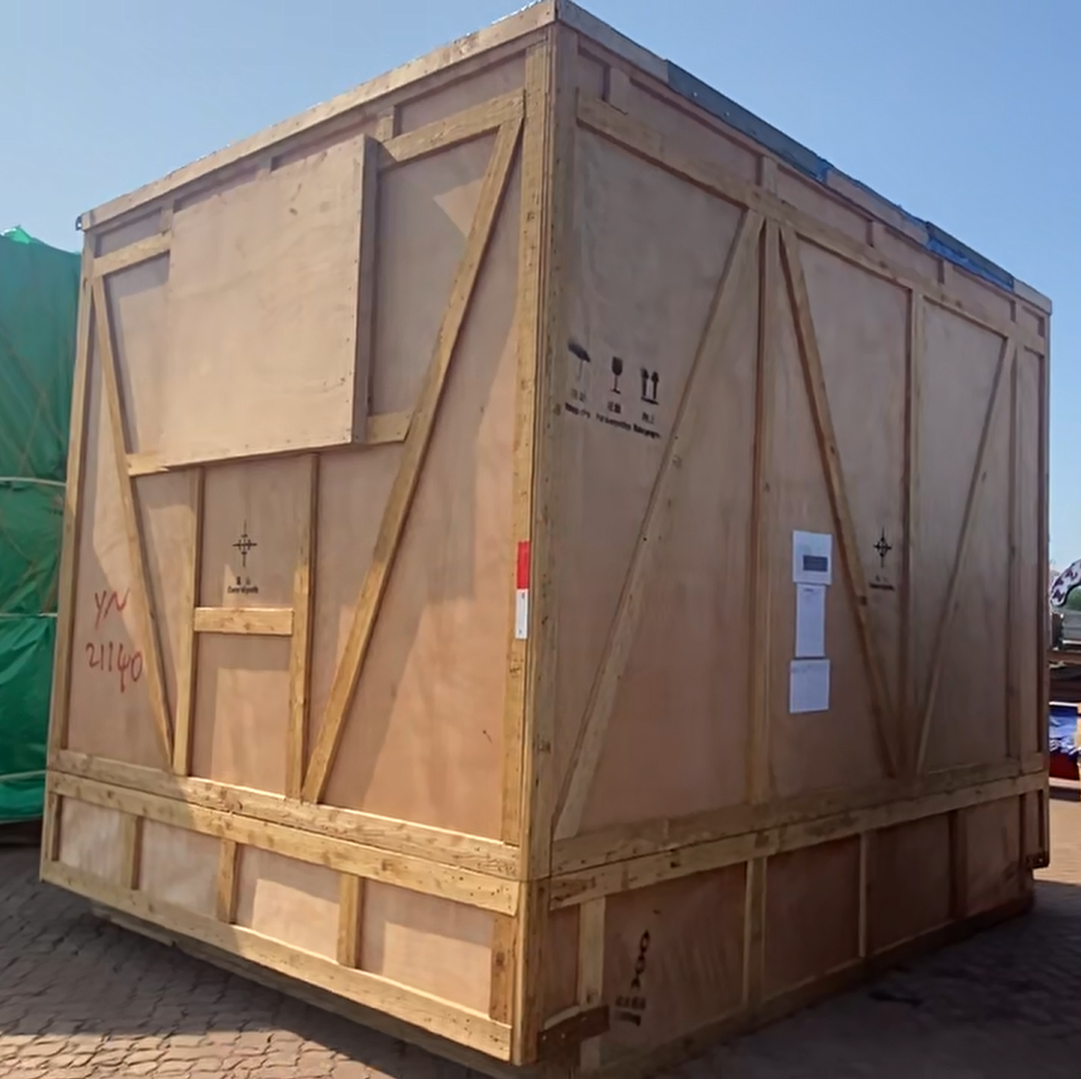
Breakbulk terminals need fast, non-contact reconstruction for cargo archiving, lifting simulation, digital twin visualization, and approximate real-scale placement. The workflow is production-oriented: capture, segment, reconstruct, scale, package, audit, and serve results to downstream twin platforms.
A crane or yard event can trigger reconstruction. The first usable output is a white mesh for placement and bounding-box estimation; the slower PBR texture stage can finish asynchronously.
A single RTX4080 16GB can run the shape stage, but keeping both shape and texture models in one process is fragile. The service separates stages into two GPU-resident workers.
Open Hunyuan3D-2.1 is not specialized for long beams, stacked steel, covered cargo, and irregular breakbulk objects. Domain LoRA adaptation injects cargo-specific geometry priors.
System blueprint
The project is organized as a closed engineering loop. Each stage has a measurable contract: what it receives, what it produces, which hardware it occupies, and how the next stage can resume after interruption.
Cargo photos come from port-side cameras, mobile phones, or event-triggered capture during crane and yard operations. The capture target is practical: enough visual coverage for reconstruction, not a carefully controlled studio dataset.
Output: input image, capture metadata, optional scale reference.Background removal and image screening reduce interference from quay ground, vehicles, cargo frames, and sky. This keeps Hunyuan3D focused on the cargo body rather than the surrounding port scene.
Output: source condition image and cleaned prompt image.GPU0 runs Hunyuan3D-2.1 shape generation with HiCache++. This is the first useful asset in the workflow because it can be placed into the digital twin before texture is ready.
Output: white mesh, bounding box, mesh statistics, shape profile.GPU1 runs the paint pipeline in low-VRAM mode. Texture is slower and memory-heavy, so it is isolated as a second queue stage instead of blocking shape generation.
Output: textured mesh, PBR maps, texture profile.The system stores GLB/OBJ artifacts, texture files, previews, and profile JSON under one job directory, then persists artifact metadata into PostgreSQL.
Output: downloadable GLB and auditable artifact record.Runtime metrics, queue wait time, P95 latency, GPU memory peaks, failure rate, mesh statistics, and LoRA validation metrics feed back into system tuning.
Output: dashboard metrics and training/evaluation records.A simple demo proves that a model can run once. CargoForge3D proves that a generative 3D model can be adapted to a constrained industrial workflow: limited VRAM, long texture latency, concurrent requests, recoverable jobs, measurable throughput, and domain-specific geometry adaptation.
Base model
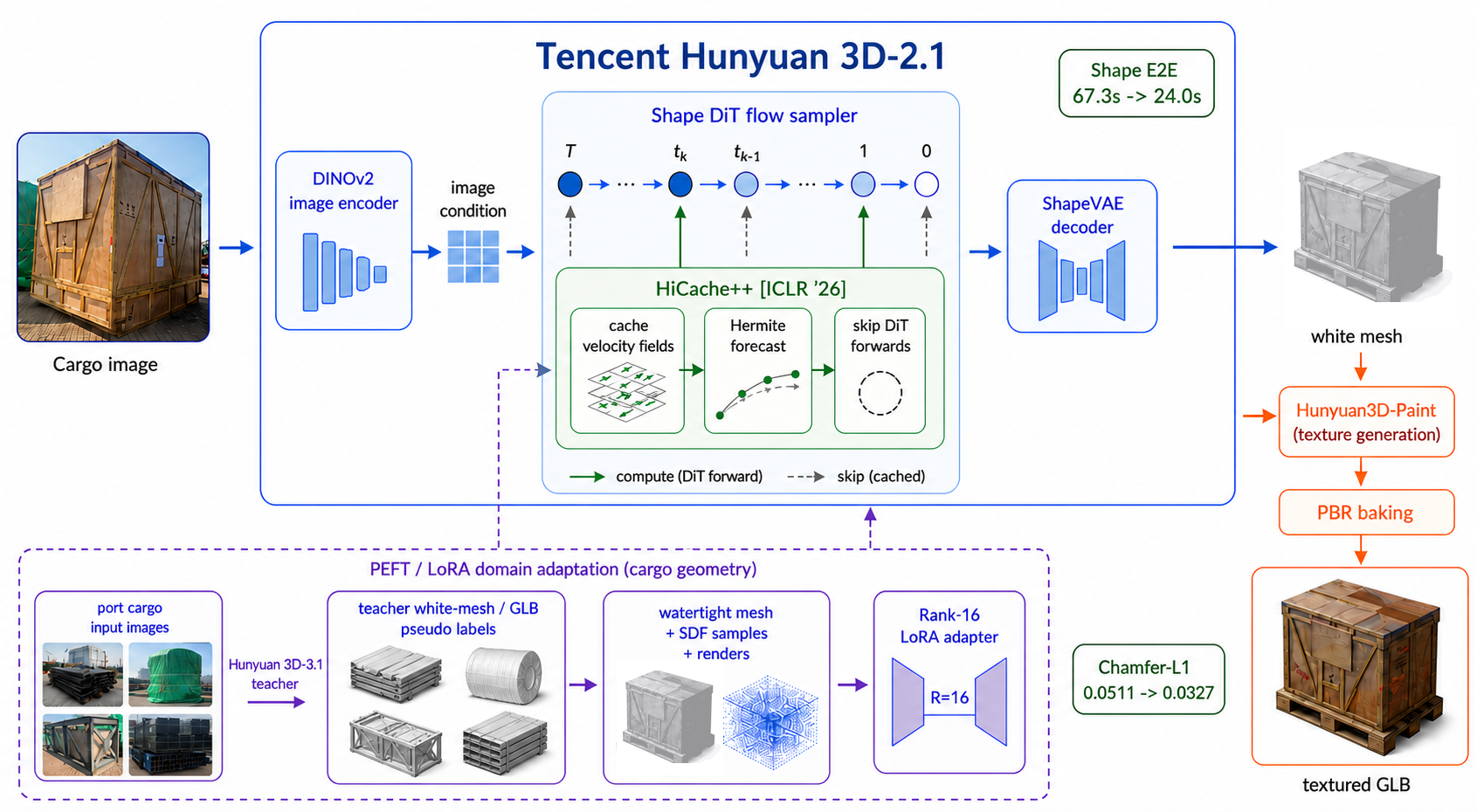
In this project, Hunyuan3D-2.1 is treated as two linked pipelines: a shape diffusion pipeline that reconstructs a white mesh from one image, and a paint pipeline that generates multi-view PBR textures and bakes them back to the mesh.
The local build fixes Windows-specific runtime issues including CUDA device binding, TorchVision compatibility, HuggingFace/hy3dgen local model lookup, dynamic module cache handling, texture-device hardcoding, and safe shape/texture memory release.
Hunyuan3D-2.1 remains a single-image shape model. This project does not claim multi-view shape generation. Multi-GPU support is implemented as staged service parallelism, not tensor-parallel DiT execution.
The input image is encoded into visual conditions, and the shape DiT denoises latent shape features through an iterative flow-matching process. After sampling, the shape VAE decodes the latent representation and the mesh extraction step converts it into a white mesh. In port use, this stage is responsible for silhouette, coarse topology, cargo proportions, and whether the object is plausible enough to enter a twin scene.
The texture pipeline renders geometry-aware condition views from the generated mesh, including normal and position information, then uses the paint model to synthesize multi-view texture images. The final step is back-projection and PBR baking. This stage is slower because it combines diffusion inference, rendering, inpainting, texture fusion, and GLB repacking.
For a port system, white-mesh latency and texture latency have different business meanings. White mesh is operational: it supports occupancy, approximate shape, and scale alignment. Texture is archival and visual: it makes the asset recognizable. Splitting them allows the service to return useful intermediate results.
Innovation 1
Port operators often need a fast white mesh before texture is available. HiCache++ targets the expensive shape sampling loop by reusing historical velocity-field information and skipping selected DiT forward passes.
At refresh steps, the model evaluates the DiT normally. At cached steps, the sampler forecasts the next latent state from historical trajectories. The acceleration is especially useful for shape-only preview, digital twin placeholders, and queue throughput under frequent field captures.
HiCache++ is inserted into the shape sampling loop, not into the VAE, mesh extraction, texture model, or renderer. This keeps the output contract unchanged: the downstream mesh extraction and texture stages still receive the same type of latent output.
The concurrent service starts the shape worker with shape acceleration enabled by default. The local start script exposes the acceleration mode and uses cache interval 3 and history length 5 for the HiCache++ path, while keeping DMD as an experimental alternative.
Acceleration is evaluated with runtime and quality signals together: sampling time, end-to-end shape time, VRAM peak, face/vertex count, watertightness, visual inspection, and whether the white mesh remains usable for downstream texture generation and twin placement.
Innovation 2
The engineering bottleneck is not only inference speed. It is queueing, state persistence, GPU isolation, failure recovery, and observability when multiple cargo reconstruction requests arrive.
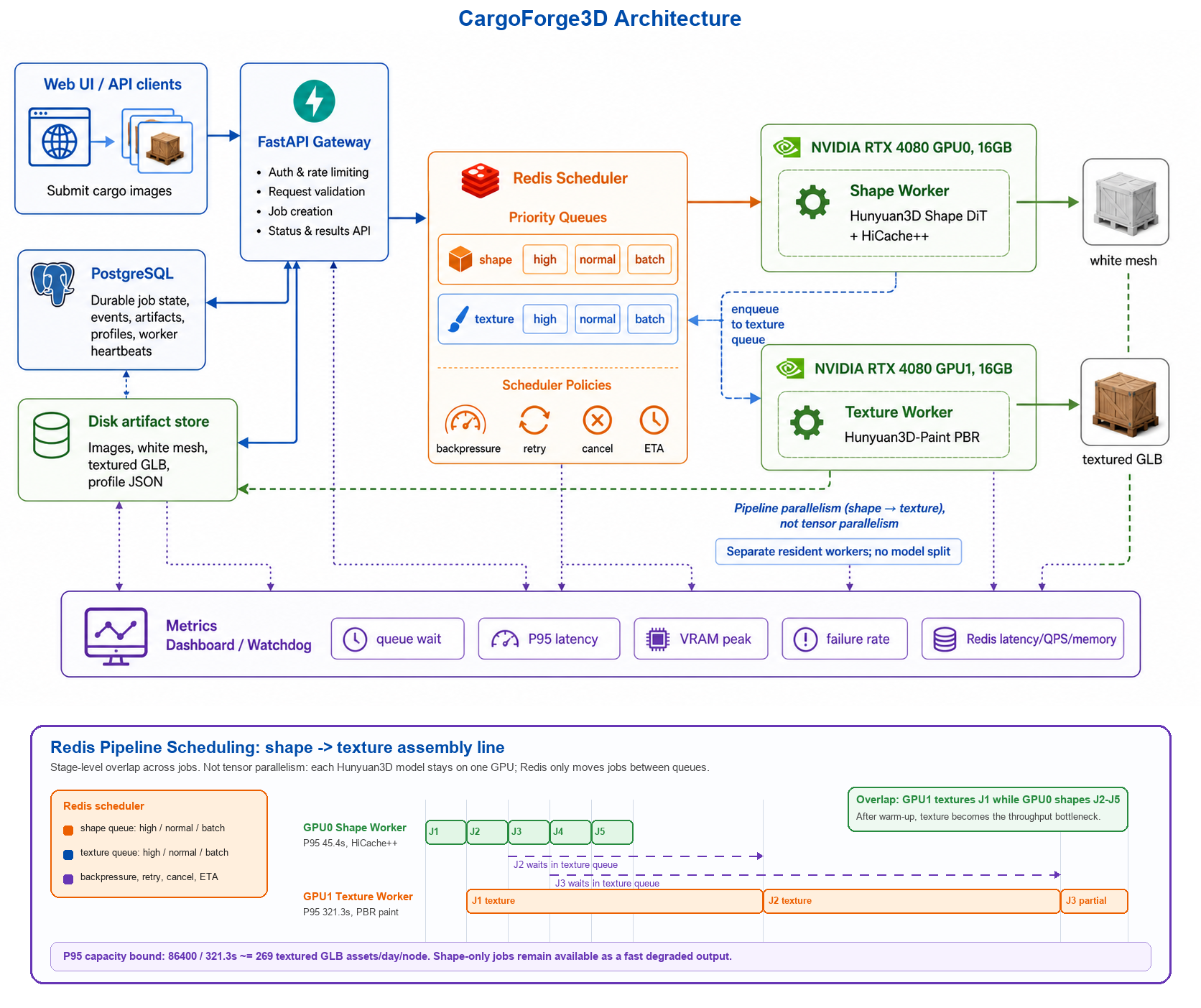
Jobs move through submitted, queued shape, running shape, queued texture, running texture, packing, completed, failed, cancelled, or retrying states. Every transition is persisted as an event.
Texture is the bottleneck stage. The system reports backlog and ETA, supports priority queues, and prevents unlimited Redis accumulation when GPU memory or texture capacity is saturated.
Workers write PostgreSQL heartbeats. A watchdog detects stale workers, handles unfinished jobs, and supports operator cleanup of queues and worker state when GPUs must be released.
The current concurrent-serving build is located at:
D:\tencent Hunyuan3D-2.1(new version)\Hunyuan3D-2.1-main\Hunyuan3D-2.1-mainThe startup script checks the Hunyuan3D conda Python, API port 8091, Redis on 6379, PostgreSQL, GPU free memory, then launches shape worker, texture worker, watchdog, and FastAPI.
powershell.exe -ExecutionPolicy Bypass -File "D:\tencent Hunyuan3D-2.1(new version)\Hunyuan3D-2.1-main\Hunyuan3D-2.1-main\start_hy3d_concurrent.ps1"Redis is deliberately limited to queueing. PostgreSQL stores durable job state, job events, artifacts, per-stage profiles, worker heartbeats, and user quotas. This makes the system recoverable after crashes and gives the dashboard a database-backed source of truth.
Logs: C:\Users\admin\Documents\New project\hy3d_concurrent_logs
Jobs: C:\Users\admin\Documents\New project\hy3d_concurrent_jobs
UI: http://127.0.0.1:8091Innovation 3
Since stronger commercial Hunyuan3D versions cannot be deployed locally, the project uses them as teachers: high-quality GLB pseudo labels are generated for real cargo images, then converted into Hunyuan3D-2.1 shape-supervision data for parameter-efficient adaptation.
Each sample becomes a preprocessed folder containing geometry arrays, watertight OBJ, multi-view render conditions, source condition image, mesh.ply, and transforms.json. This matches the mesh-quality LoRA training pipeline.
The A100 run uses bf16 mixed precision, DINOv2-Large, Hunyuan3D-2.1 DiT weights, LoRA rank 16, alpha 16, dropout 0.05, TensorBoard logging, periodic adapter export, and validation every 100 steps.
The LoRA adapter updates selected linear projections inside the shape model while keeping the base model mostly frozen. The goal is not to memorize one cargo model, but to bias the shape generator toward port-specific geometry: elongated steel members, stacked cargo, large flat faces, and irregular industrial parts.
Real ground-truth 3D scans are expensive in port scenes. Teacher GLBs from a stronger commercial model provide scalable pseudo supervision. They are not treated as perfect truth; they are filtered, cleaned, converted, and checked before training.
The validation loop combines numerical geometry metrics with visual checks. Chamfer-L1 and F-score quantify shape alignment, while GLB inspection catches failure modes that scalar loss can hide, such as collapsed thin structures or over-smoothed industrial edges.
Interactive results
Geometry and texture are inspected separately because the production pipeline is staged: white mesh quality, texture feasibility, runtime profile, and final GLB packaging are evaluated as separate concerns.
LoRA visual check
The LoRA comparison is shown as interactive mesh panels so reviewers can rotate the same validation item and inspect geometry changes across checkpoints.
Implementation map
Project outcome
CargoForge3D demonstrates an end-to-end engineering path for port cargo assets: field capture, segmentation and preprocessing, accelerated white-mesh generation, low-VRAM texture serving, GLB/PBR export, job audit, capacity profiling, and domain adaptation. The work is connected to a Yantai Port digital twin reconstruction project and is designed around real terminal constraints.